



The short answer
Website redesign vs new website comes down to what is wrong with the site; its age matters far less. Refresh it if it brings in work but looks dated, redesign it if visitors do not ring, and rebuild it if it is slow, breaks on phones or is stuck on a platform you have outgrown. Either way, keep or redirect pages that earn visits.
Find out what is costing your site enquiries Run the free instant website check →
Website redesign vs new website vs revamp: what is the difference?
Two quotes for “a redesign”, a “revamp” or “a new website” can describe very different jobs. Before you compare prices, pin down which of the three you are being offered.
"Revamp" has no fixed meaning. In our experience it usually means a refresh or a redesign, rarely a full rebuild, so ask which one the quote covers.
Refresh, redesign and rebuild compared
Refresh
- What changes
- The look: colours, fonts, photos, maybe the header and footer.
- What stays
- The platform, the pages, the wording and the page addresses.
- When it is right
- The site works and brings in enquiries. It just looks older than your business does now.
- Rough cost pointer
- Usually the smallest bill, often priced by the hour (Bark: about £35 to over £150 an hour). On a builder such as Wix or Squarespace you may be able to do it yourself.
Redesign
- What changes
- The structure and the words: which pages exist, what goes where, how you explain the work.
- What stays
- Usually the platform and the domain, and as many page addresses as possible.
- When it is right
- People visit but do not get in touch, your services have changed, or the pages that matter are buried.
- Rough cost pointer
- Priced much like a new site, because most of the work is the same. See what a redesign costs.
Rebuild (a new website)
- What changes
- Everything underneath: the platform, the code, the hosting. Worthwhile content is carried across.
- What stays
- Your domain, and the search value of pages that already earn visits, if the move is done properly.
- When it is right
- The site is slow, breaks on phones, cannot be updated without something breaking, or is stuck on a platform you want to leave.
- Rough cost pointer
- ExpertSure: £500 to £1,500 (freelance brochure site), £1,500 to £3,000 (business site). Bark: £1,000 to £3,000 freelance, £2,000 to £7,000 agency. Coltura: £1,400.
| Option | What changes | What stays | When it is right | Rough cost pointer |
|---|---|---|---|---|
| Refresh | The look: colours, fonts, photos, maybe the header and footer. | The platform, the pages, the wording and the page addresses. | The site works and brings in enquiries. It just looks older than your business does now. | Usually the smallest bill, often priced by the hour (Bark: about £35 to over £150 an hour). On a builder such as Wix or Squarespace you may be able to do it yourself. |
| Redesign | The structure and the words: which pages exist, what goes where, how you explain the work. | Usually the platform and the domain, and as many page addresses as possible. | People visit but do not get in touch, your services have changed, or the pages that matter are buried. | Priced much like a new site, because most of the work is the same. See what a redesign costs. |
| Rebuild (a new website) | Everything underneath: the platform, the code, the hosting. Worthwhile content is carried across. | Your domain, and the search value of pages that already earn visits, if the move is done properly. | The site is slow, breaks on phones, cannot be updated without something breaking, or is stuck on a platform you want to leave. | ExpertSure: £500 to £1,500 (freelance brochure site), £1,500 to £3,000 (business site). Bark: £1,000 to £3,000 freelance, £2,000 to £7,000 agency. Coltura: £1,400. |
For most small businesses a “new website” and a “rebuild” mean the same thing.
When should you redesign a website?
Start with what is wrong with the site. Its age tells you much less.
- Signs a refresh is enough: it is quick on a phone, people find it on Google, and enquiries come in. It just looks dated, or your photos and branding have moved on.
- Signs you need a redesign: visitors leave without calling; your services, prices or areas have changed; you have rebranded, renamed or changed what the business does; customers ask questions the site should answer; or the site talks about you and skips what the customer needs to know. A new name often means a new domain too, which is a site move: follow the checklist below.
- Signs you need a rebuild: it is slow on a phone; it was built on a theme or plugin that is no longer supported; nobody can edit it without breaking something; it is locked into a platform you want to leave; or fixing it piece by piece would cost more than starting again.
Before choosing, write down what the site must do that it does not do now. “Look more modern” is a refresh brief. “Get more people to ring about boiler installs” is a redesign brief. “Let me add a page without breaking the layout” can be a rebuild brief.
If you cannot tell which list you are on, a free Growth Audit looks at the site the way a customer would, then the way a search engine does.
Website rebuild or redesign: which is right for an old site?
In our experience, a small business site left untouched for five years or more often needs a full rebuild. The reason is its foundations: themes and plugins that are no longer updated, layouts built before most visitors used phones, and code that slows every change down. Patching that can cost more than starting again, because each fix takes longer and can break something else. If an older site is still fast on a phone and easy to update, a redesign may be all it needs.
The platform matters too. Some builders tie your site to their servers. Wix, for example, says a Wix site has to be hosted and run on Wix’s servers. Wix has no way to export the site itself, so most words and photos are copied across by hand. Squarespace can export part of a site in a WordPress format: layout pages, one blog, text and image blocks, and gallery pages on older (7.0) sites. Store pages, page-specific headers, footers and sidebars, and style settings are left behind. So “moving off the builder” is a rebuild, and should be quoted as one.
Coltura’s Growth Website is a full rebuild at £1,400, which you own. If you would rather hand the whole job over, see our website redesign service. Our redesign cost guide and website costs explained compare the options.
How do I redesign my website without losing SEO? (site migration checklist)
In our experience, much of the search value a site has sits in its existing page addresses and the words on them. Google treats a change of addresses as a site move, and its own guide says to “expect temporary fluctuation in site ranking during the move”. For a small to medium-sized site it can take a few weeks for most pages to move. This website redesign checklist keeps that risk down. Steps marked (Google) come from that guide; the rest are our practice.
Before launch
- List every page you have now, and note which bring visits and enquiries. Search Console and your analytics will show you.
- Keep addresses that work. If /boiler-repairs-stockport earns visits, keep that exact address where you can.
- Keep the copy on ranking pages. Improve it, but do not swap it wholesale for new wording: the words are part of why the page is found.
- Carry over title tags and meta descriptions on ranking pages: the blue headline and short summary Google often shows for the page. Copy them across, then change them deliberately later.
- Write a redirect map (Google). For every address that changes, write the old address and the new one it should point to.
- Set up analytics and conversion tracking on the new site, so calls and form enquiries are counted from day one. Google suggests analysing both old and new sites.
- Protect your email if the host changes. Write down the domain’s DNS settings, especially the email (MX) records, before anything moves, and make sure you can log in to the domain account yourself. Moving a website should not stop your email.
Launch day
- Switch on the redirects (Google). A 301 redirect is a permanent forwarding address: anyone, or Google, asking for the old page is sent to the new one. Google recommends server-side permanent redirects, such as 301 or 308.
- Remove the staging noindex and check robots.txt (Google). Sites are often hidden from search while being built; remove any noindex or robots.txt blocks that were only needed for the move.
- Check canonicals (Google). Each page carries a hidden note naming its main address; on the new site it should name the page’s own new address.
- Update internal links (Google) so they go straight to the new addresses without passing through a redirect.
- Submit the new sitemap in Search Console (Google), and test a few old addresses to confirm they forward.
After launch
- Check for 404s. Watch Search Console for a jump in “Not found” errors (Google) and redirect any old address that still earns visits.
- Update the website link everywhere else: your Google Business Profile, directories and social profiles. Google suggests updating as many links as possible, including profile links.
- Watch Search Console and your tracking for the following weeks: Page indexing, Sitemaps, and whether calls and forms are still being recorded. If pages drop out, our guide to why a website is not showing on Google walks through the checks.
- Keep the redirects (Google) for as long as possible, generally at least a year. For visitors, Google suggests considering keeping them for good.
★★★★★
“… He took the vision for my brand, Byte & Batter, and built a premium, high-converting digital storefront entirely from scratch. …”
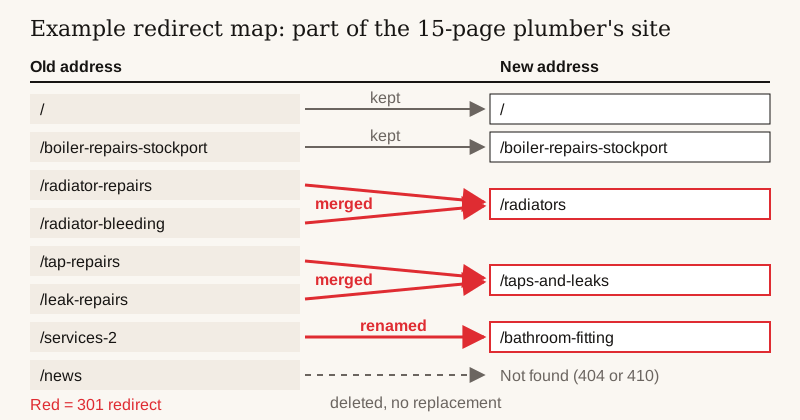
Example: a redirect map for a 15-page site
A made-up example to show the arithmetic. Say a plumber’s 15-page site is rebuilt, merging thin service pages and dropping an old news page.
Example only: planning redirects for a 15-page site
Kept, same address (home, contact, main service pages)
- Pages
- 8
- Redirects needed
- 0
Four thin service pages merged into two fuller ones
- Pages
- 4
- Redirects needed
- 4 (two old pages point to each new page)
Renamed with clearer addresses
- Pages
- 2
- Redirects needed
- 2
Old news page with no replacement, left to return “not found” (404 or 410), as Google advises for deleted content
- Pages
- 1
- Redirects needed
- 0
Total
- Pages
- 15
- Redirects needed
- 6
| What happens | Pages | Redirects needed |
|---|---|---|
| Kept, same address (home, contact, main service pages) | 8 | 0 |
| Four thin service pages merged into two fuller ones | 4 | 4 (two old pages point to each new page) |
| Renamed with clearer addresses | 2 | 2 |
| Old news page with no replacement, left to return “not found” (404 or 410), as Google advises for deleted content | 1 | 0 |
| Total | 15 | 6 |
Six redirects is a small job, but if the four merged pages had simply been deleted, any visits and links they had earned would have hit an error page.
How long does a website redesign take?
Timelines vary with size and with how quickly content arrives. ExpertSure’s guide says a freelance small business site of 5 to 15 pages is typically delivered in 2 to 6 weeks, and agency builds typically take 8 to 16 weeks. Both are vendor estimates for the whole project.
How a Coltura rebuild runs. These are our own six stages. They do not compare directly with the ranges above, because our build time starts once the direction is agreed and your content is in.
- Discovery, free, within 48 hours. A Growth Audit sets out what is costing you enquiries in writing, and one short conversation (about 30 minutes) covers whether a rebuild is the right spend for you right now.
- Strategy, in week one. Before any design, we agree how the business is explained and which pages exist.
- Design. The build begins once the direction is agreed and you have got us your content. You see the real site on a private link, with one round of considered changes.
- Development, about 14 working days of build in all.
- Testing, before go-live. Every form and phone link is tested, and every old page has its redirect ready.
- Launch and ongoing support. The site goes live and we watch it for 30 days, fixing anything that does not work as built at no charge. After that, Growth Care is there if you want it.
14 working days is just under three weeks of build. What most often stretches a timeline is content that has not been gathered: your logo, photos of real work, reviews, prices or “from” figures, areas covered and accreditations. Coltura writes the copy, but those facts have to come from you. You can see past builds on our projects page.
Website redesign vs refresh: when is a refresh enough?
A refresh, or simply some maintenance, is the right call when:
- Enquiries are steady and the problem is purely how it looks.
- The issue is out-of-date content: old prices, staff who have left, a service you have dropped. That is an afternoon of edits.
- Your site is on a builder such as Wix or Squarespace and you are comfortable in its editor. New photos, tidier wording and updated colours are a do-it-yourself refresh. If you would rather pay someone, see what web designers charge in the UK.
- The site is on a platform you are happy with and it is fast on a phone.
- You rank well for the searches that bring you work and do not want to risk any movement at all right now.
What questions should you ask before a website redesign?
Most of the decision comes down to a few questions. Ask yourself the first three before you talk to anyone, and ask whoever quotes the rest.
- Is the problem the look, the words or the foundations? That decides refresh, redesign or rebuild, as in the table at the top.
- What must the site do that it does not do now? One sentence, such as “get more people to ring about boiler installs”.
- Which pages bring visits and enquiries now? Search Console and your analytics will show you. Those are the pages to protect.
- Which pages will change address, and where will each one redirect? Ask for the redirect map in writing.
- Who owns the new site, the domain and the accounts? Our guide to who owns your website explains what to check.
- Will the hosting change, and what will it cost each year? See what a website costs to run, and make sure your email will not be disrupted.
- What happens if something breaks after launch, and for how long is it fixed at no charge?
Google reviews
What clients say
★★★★★
“A rare mix of technical depth, commercial clarity, and design awareness. Adam brings a fresh, intuitive approach to web development with an exceptional grasp of the technology, and the patience to guide you through it.”
★★★★★
“He took the vision for my brand, Byte & Batter, and built a premium, high-converting digital storefront entirely from scratch.”
Quoted word for word from Coltura's Google Business Profile. See the sites behind them on the work page.
FAQ
Common questions
Will redesigning my website hurt my SEO?
Google warns of temporary ranking fluctuations whenever page addresses change. Keep addresses that work, keep the wording and page titles on pages that rank, and give every changed address a permanent (301 or 308) redirect, a forwarding address to its new page.
What is the difference between a website refresh and a redesign?
A refresh changes the look and keeps the pages and wording. A redesign changes the structure and the words, and usually keeps the platform.
Is it cheaper to redesign or build a new website?
For an old site, starting again can be cheaper than patching it, because every fix on old foundations takes longer. For a modern site that works, a refresh or redesign is usually cheaper.
Can I redesign my website myself?
A refresh, yes, if your site is on a builder such as Wix or Squarespace and you are comfortable in its editor: new photos, tidier wording and updated colours are a do-it-yourself job. A redesign or rebuild changes pages and addresses, so follow the SEO checklist above to keep the visits you already get.
How often should you redesign a website?
There is no fixed cycle. Redesign when the site stops doing its job, such as when enquiries dry up, your services change or it struggles on phones. The number of years on its own tells you little.
How long should I keep redirects after a redesign?
Google says to keep redirects for as long as possible, generally at least a year, and suggests considering keeping them for good for visitors’ sake.
Can I move my Wix site to a new designer?
Wix says a Wix site has to run on Wix’s servers, and its help centre offers no way to export the site itself, so moving off Wix means rebuilding and copying most words and photos across by hand. You can stay on Wix and have it redesigned there instead.
What should I prepare before a website redesign?
A list of your current pages and which ones bring visits, what the site must do that it does not do now, and your content: photos of real work, reviews, prices and accreditations.
Read next
Sources
- Google Search Central: site moves with URL changes (Ranking fluctuation; 301/308 redirects; URL mapping; remove migration-only noindex and robots.txt blocks; self-referencing canonicals; internal and profile links; analytics on both sites; “Not found” errors; sitemaps; keep redirects generally at least 1 year)
- ExpertSure: website design costs guide (Brochure site £500 to £1,500, business site £1,500 to £3,000; freelance site delivered in 2 to 6 weeks, agency 8 to 16 weeks (vendor estimates, prices verified Aug 2026))
- Bark: web design price guide (About £35 to over £150 an hour; small business site £1,000 to £3,000 freelance, £2,000 to £7,000 agency (vendor estimate))
- Wix Help Center: exporting or embedding your Wix site elsewhere (A Wix site must be hosted and operated on Wix’s servers; no site export)
- Squarespace Help: exporting your site (Exports layout pages, one blog, text and image blocks, gallery pages on 7.0 sites; leaves out store pages, page-specific headers, footers and sidebars, styles)
Outside prices were checked in October 2026 and change often; check the provider before you buy. Industry price ranges are the firms' own published estimates.