


The short answer
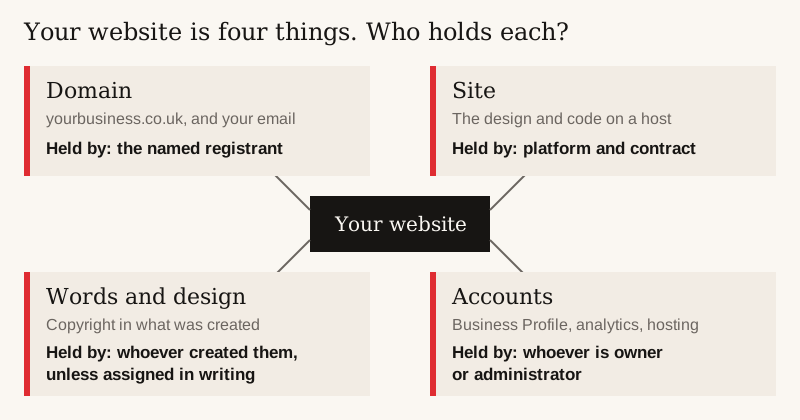
You own your domain only if you are its named registrant; check your registrar account. A website is four parts: the domain, the site, the words and design, and the accounts. Each can have a different owner. If a designer built it, copyright in what they created stays with them unless your contract assigns it to you in writing.
Before you move, know what your site needs Run the free instant website check →
Who owns my website: the domain, the site or the content?
Several different things get called “my website”, and a contract can give you one and not the others. Check each one separately.
The parts of a website, who holds each, and how to check
Domain
- What it is
- Your address, such as yourbusiness.co.uk; it also carries your email
- Who owns it
- The named registrant
- How to check
- Your registrar account, or written confirmation
Site
- What it is
- The design and code running on a host
- Who owns it
- Depends on the platform and your contract
- How to check
- The platform's terms and your contract
Words, photos and design
- What it is
- Your content, and the creative work in the site
- Who owns it
- Whoever created them, unless assigned to you in writing
- How to check
- Your contract: look for a written copyright assignment
Accounts
- What it is
- Google Business Profile, analytics, hosting and registrar logins
- Who owns it
- Whoever is set up as owner or administrator
- How to check
- Log in and check that your role is owner; managers and users have fewer rights
| Part | What it is | Who owns it | How to check |
|---|---|---|---|
| Domain | Your address, such as yourbusiness.co.uk; it also carries your email | The named registrant | Your registrar account, or written confirmation |
| Site | The design and code running on a host | Depends on the platform and your contract | The platform's terms and your contract |
| Words, photos and design | Your content, and the creative work in the site | Whoever created them, unless assigned to you in writing | Your contract: look for a written copyright assignment |
| Accounts | Google Business Profile, analytics, hosting and registrar logins | Whoever is set up as owner or administrator | Log in and check that your role is owner; managers and users have fewer rights |
Check the accounts too. On a Google Business Profile, Google tells owners “you have full control over the profile” and that they can add or remove users. Managers can do almost everything else but “can't add or remove users or remove the profile”. In Google Analytics, you “need to have the Administrator role” to add or change users. If your designer is the only owner or administrator, you are a guest in your own accounts. Ask to be made owner (or primary owner) of each, including the hosting and registrar accounts.
Who owns what, by set-up (from each company's own pages and terms, checked October 2026)
Built yourself, on your own hosting
- Domain
- Yours, if you are the named registrant
- The site itself
- Yours; you can move it to another host
- Words and photos
- Yours
Wix
- Domain
- Yours if registered in your name; connecting your own domain needs a paid plan
- The site itself
- Has to stay on Wix's servers
- Words and photos
- Wix's terms say you own your content. Wix has no way to export the site itself, so most words and photos are copied across by hand
Squarespace
- Domain
- Whoever is named as registrant: check your account
- The site itself
- Stays on Squarespace; part of it exports in a WordPress format
- Words and photos
- Layout pages, one blog, text and image blocks, and gallery pages on older (7.0) sites export; images may need downloading by hand
Shopify
- Domain
- Whoever is named as registrant: check your account
- The site itself
- The theme file can be downloaded; we found no full-site export
- Words and photos
- Products export to a spreadsheet file, without images
Pay-monthly provider (Yell as the example)
- Domain
- Yell's terms say a domain it registers for you is yours
- The site itself
- Yell's terms say it cannot be moved to another host without Yell's prior written agreement
- Words and photos
- Yell's terms say Yell owns content it creates; it may license the written copy to you on cancellation if your account is paid up
Coltura
- Domain
- In your name from day one
- The site itself
- Yours; you can host it yourself
- Words and photos
- Yours
| Set-up | Domain | The site itself | Words and photos |
|---|---|---|---|
| Built yourself, on your own hosting | Yours, if you are the named registrant | Yours; you can move it to another host | Yours |
| Wix | Yours if registered in your name; connecting your own domain needs a paid plan | Has to stay on Wix's servers | Wix's terms say you own your content. Wix has no way to export the site itself, so most words and photos are copied across by hand |
| Squarespace | Whoever is named as registrant: check your account | Stays on Squarespace; part of it exports in a WordPress format | Layout pages, one blog, text and image blocks, and gallery pages on older (7.0) sites export; images may need downloading by hand |
| Shopify | Whoever is named as registrant: check your account | The theme file can be downloaded; we found no full-site export | Products export to a spreadsheet file, without images |
| Pay-monthly provider (Yell as the example) | Yell's terms say a domain it registers for you is yours | Yell's terms say it cannot be moved to another host without Yell's prior written agreement | Yell's terms say Yell owns content it creates; it may license the written copy to you on cancellation if your account is paid up |
| Coltura | In your name from day one | Yours; you can host it yourself | Yours |
How do I find out who owns my domain name?
- Find who you pay for it. Search your email for a domain renewal notice or invoice. That company is your registrar, or a reseller of one.
- Log in to that account and open the domain. Check the registrant (owner) name is you or your business, spelt exactly as your company is registered.
- Look it up at rdap.nominet.uk. Nominet, which runs .uk, is replacing the old WHOIS lookup with RDAP. The result shows the registrar or reseller that manages the domain, which may be your designer's supplier rather than you. It shows the owner's name only if they opted in, so a blank owner does not mean it is not yours.
- For a .com (or another non-.uk ending), look it up at lookup.icann.org, ICANN's free lookup tool. It shows "the name of the registrar sponsoring the domain name's registration". The owner's details are often hidden: ICANN says not all registration data has to be returned, and a hidden field carries a “redacted” label. As with .uk, a hidden owner does not mean it is not yours.
- If you cannot log in, ask whoever set it up to confirm in writing that you are the registrant. If you are not, ask them to change it to you.
- Once it is yours, keep the login somewhere safe and switch on auto-renew. A lapsed domain takes your website and email with it.
Keeping a .co.uk is cheap. Krystal, for example, charges £7.99 a year to register and renew, ex VAT. A domain held hostage costs far more than that in lost email and links.
What if my web designer owns my domain?
First check what they actually hold. If you are the named registrant and they only manage the account, it is a smaller job: ask for the login, or ask them to move the domain to a registrar account in your name. If they are the registrant, the registrant has to be changed to you as well.
- Ask in writing. Name the domain, the registrar account you want it moved to, and a date.
- For a .uk domain, the move between registrars is done today by changing the domain's tag (the “IPS tag”) to the new registrar's. Nominet says that from Tuesday 9 February 2027 this changes: the current registrar gives the registrant a Transfer Authorisation Code, valid for 14 days, to pass to the new one.
- Ask for the registrant name to be corrected to you or your company at the same time.
- Watch the renewal date. If the domain lapses during a disagreement, your website and email go with it, so get it renewed first.
- If they refuse, Nominet runs a Dispute Resolution Service for .uk names. Its published fee schedule (updated 9 April 2026) lists £200 for a summary decision and £750 for a full expert decision. Take legal advice before you use it.
Does my web designer own the copyright in my website?
Often, yes, unless your contract says otherwise. The Copyright, Designs and Patents Act 1988, section 11 says "The author of a work is the first owner of any copyright in it". Where the work is made by an employee in the course of employment, "his employer is the first owner of any copyright in the work subject to any agreement to the contrary". So the words and design a freelancer writes belong to the freelancer, and work by an agency's staff belongs to the agency. By default, neither belongs to you as the client.
Paying the invoice does not by itself change that. Section 90(3) says "An assignment of copyright is not effective unless it is in writing signed by or on behalf of the assignor". The assignor is the designer or agency handing the copyright over.
- Best: a written assignment, signed by or on behalf of the designer or agency, of the copyright in the design, code and words they create for you.
- At least: a written licence that lets you use, change and move the design, code and words, including to another host or designer.
- Ask which parts are someone else's, such as a bought theme, stock photos or fonts, and what licence covers them.
Ask before work starts; it is much harder to agree once there is a dispute. This page gives general information and does not count as legal advice. If you are already in a dispute over copyright, take legal advice.
Do I own my website on Wix? Does Wix own my content?
Wix's terms say you own your content. The site is a different matter. Wix says a site “needs to be hosted and operated on Wix's servers” and that its system “does not support external hosting”. Wix has no way to export the site itself, so most words and photos are copied across by hand and the site is rebuilt elsewhere.
You can use your own domain on Wix, but connecting it needs a paid plan. UK plans start at £9 a month billed annually, going by ExpertSure, plus VAT: Wix's plans page says “Prices do not include applicable taxes”. If you bought the domain through Wix, check whose name it is registered in, using the steps above.
★★★★★
“… He took the vision for my brand, Byte & Batter, and built a premium, high-converting digital storefront entirely from scratch. …”
Do I own my Squarespace or Shopify website?
Squarespace lets you export part of a site in a format WordPress can read: layout pages, one blog, text and image blocks, and gallery pages on older (7.0) sites. Store, portfolio, index and calendar pages, page-specific headers, footers and sidebars, extra blogs, product, video and audio blocks, and all your styling and custom CSS stay behind. Download your images before you cancel; they may not come across on their own.
Shopify lets you download your theme file, which it emails as a .zip without your products, pages, blog posts or images. Products export to a spreadsheet file, but that also leaves out the images. We found no Shopify page offering a full-site export, so moving a shop means rebuilding it.
Do you have to pay monthly to own a website?
No. A one-off build can be yours outright, though hosting and the domain still cost something each year (running costs). With a pay-monthly website, ownership depends on the provider's terms, and some, such as Opace and Yoohoo Creative, only pass it to you after a 12-month term: our guide to whether you have to pay monthly for a website compares them.
Can I move my website from Wix to another host?
You cannot move a Wix site itself, and Squarespace and Shopify only let part of a site out. What you can move is the domain, the words and the photos. In practice moving means rebuilding, which our guide to website redesign costs prices; redesign vs a new website helps you decide how far to go.
Example: leaving Wix, what comes with you
Domain
- Comes with you?
- Yes, if you are the named registrant
- How
- Move it to a registrar account in your name before you cancel
Words
- Comes with you?
- Yes: Wix's terms say you own your content
- How
- Copied across by hand; Wix has no site export
Photos
- Comes with you?
- Yes, if they are yours
- How
- Downloaded by hand
Design and code
- Comes with you?
- No
- How
- Wix says a site “needs to be hosted and operated on Wix's servers”; it is rebuilt elsewhere
Wix plan
- Comes with you?
- Not needed after the move
- How
- Cancel only once the new site is live
| Item | Comes with you? | How |
|---|---|---|
| Domain | Yes, if you are the named registrant | Move it to a registrar account in your name before you cancel |
| Words | Yes: Wix's terms say you own your content | Copied across by hand; Wix has no site export |
| Photos | Yes, if they are yours | Downloaded by hand |
| Design and code | No | Wix says a site “needs to be hosted and operated on Wix's servers”; it is rebuilt elsewhere |
| Wix plan | Not needed after the move | Cancel only once the new site is live |
- Make sure the domain is in your name. If you bought it through the builder, move it to a registrar account in your name before you cancel; the builder's help pages explain how.
- List every page address on the old site. You need these for redirects.
- Save the content. On Wix, copy the words and download the photos by hand. On Squarespace, run the export and download the images. On Shopify, export the products and save the images separately.
- Build the new site and set up a redirect from every old page address to its new one, so visitors and Google find the right page.
- Point the domain at the new site, then test every form, phone link and email address.
- Only then cancel the old plan.
If pages go missing from Google after the move, our guide to a website not showing on Google explains how to check.
What to ask a web designer about who owns the website
- Whose name will the domain be registered in?
- Whose name is the hosting account in, and will I have the login?
- Can I move the site to another host if I leave? Is there a fee?
- Who owns the copyright in the design, code, words and photos you create for me? Will you assign it to me in writing?
- Will I have the owner role, above manager or user, on my Google Business Profile, analytics and hosting accounts?
- What happens to the site if I stop paying you?
Ask these alongside the price. Our guide to how much web designers charge has a full checklist of what a quote should spell out.
Coltura's answers: you own the website, the domain, the content and every account we set up, in your name from day one, with nothing held back under licence. If you stop working with us, you take it all and it keeps working. Growth Care at £149 a month is optional (cancel any time, with a month's notice), or you can host the site yourself. The build is a fixed £1,400; see what the Growth Website includes.
When is staying on Wix, Squarespace or a monthly plan the right call?
Not owning the site outright only matters on the day you want to leave. If your builder site brings in work, you like editing it yourself and the monthly cost suits you, staying is a sensible choice. Just make sure the domain is in your name and keep copies of your words and photos.
The same goes for a pay-monthly plan you are happy with. Know your term, your notice period and what you can take. Our Wix vs custom websites guide covers when it is worth moving.
Google reviews
What clients say
★★★★★
“A rare mix of technical depth, commercial clarity, and design awareness. Adam brings a fresh, intuitive approach to web development with an exceptional grasp of the technology, and the patience to guide you through it.”
★★★★★
“He took the vision for my brand, Byte & Batter, and built a premium, high-converting digital storefront entirely from scratch.”
Quoted word for word from Coltura's Google Business Profile. See the sites behind them on the work page.
FAQ
Common questions
How do I find out who owns my domain name in the UK?
Log in to the registrar account you pay for the domain and check the registrant name. A lookup at rdap.nominet.uk shows the registrar or reseller managing a .uk name, and the owner only if they opted in; for a .com, ICANN's lookup.icann.org shows the registrar.
My web designer registered my domain. Is it mine?
Only if you are named as the registrant. Ask them to confirm it in writing, and if it is in their name, ask them to change it to yours.
What if my web designer will not give me my domain?
Ask in writing for it to be moved to a registrar account in your name and renewed meanwhile. For .uk names, Nominet runs a Dispute Resolution Service; take legal advice before you use it.
If I paid a web designer, do I own the copyright?
Not by payment alone. Under the Copyright, Designs and Patents Act 1988 the author is the first owner of copyright, and an assignment only works if it is in writing and signed by or on behalf of the designer (s.90(3)). Ask for a written assignment, or at least a licence, of the design, code and words; take legal advice for a dispute.
Does Wix own my content?
No. Wix's terms say you own your content. The site itself has to stay on Wix's servers, and Wix has no way to export it, so most words and photos are copied across by hand.
Can I move my website from Wix to another host?
Not the site itself: Wix says its sites cannot be hosted elsewhere. You can move your domain, words and photos, and rebuild the site on the new host.
Do I own my Squarespace website?
You can export part of it: layout pages, one blog, text and image blocks, and gallery pages on older (7.0) sites. The design, store pages and much else stay behind, and images may need downloading by hand.
Do I own a Yell website?
Yell's terms say a domain it registers for you is yours, but the site cannot move to another host without Yell's prior written agreement, and Yell owns content it creates (though if all charges are paid, Yell may grant you a licence to use the written copy it created, Website rules para 11). Check your own order and contract.
Who owns a website Coltura builds?
You do. The website, domain, content and accounts are in your name from day one, and you can host it yourself or leave with all of it.
Read next
Sources
- legislation.gov.uk: Copyright, Designs and Patents Act 1988, s.11 (the author is the first owner of copyright; an employee's work belongs to the employer)
- legislation.gov.uk: Copyright, Designs and Patents Act 1988, s.90 (an assignment must be in writing, signed by or on behalf of the assignor)
- Google Business Profile Help: manage owners and managers (owners have full control; managers cannot add or remove users)
- Google Analytics Help: add, edit and delete users (Administrator role needed to add or change users)
- Wix: connecting a domain to Wix using the pointing method ("You must upgrade your Wix site before you can connect your domain")
- Nominet: WHOIS and RDAP for .uk (lookup shows registrar; owner only if opted in; moving to RDAP)
- Nominet: .UK registry FAQ (Transfer Authorisation Codes from 9 February 2027, valid for 14 days, given to the registrant by the current registrar)
- Nominet: UK pricing schedule (updated 9 April 2026) (Dispute Resolution Service: summary decision £200, expert decision £750)
- Nominet RDAP lookup (public .uk lookup)
- ICANN Lookup (registration data lookup tool) and its FAQ (shows the sponsoring registrar; not all registration data is returned; hidden fields marked redacted)
- ICANN: information for RDAP users (ICANN's free browser RDAP lookup tool at lookup.icann.org)
- Wix: exporting or embedding your Wix site elsewhere (sites must be hosted on Wix servers)
- Wix terms of use (you own your content (section 3.1))
- ExpertSure: Wix pricing UK (Aug 2026) (Wix UK plan prices)
- Wix: plans (Oct 2026) ("Prices do not include applicable taxes")
- Squarespace: exporting your site (Oct 2026) (layout pages, one blog, text and image blocks, gallery pages on 7.0 sites)
- Shopify: downloading themes (theme emailed as a .zip; no products, pages, blog posts or images)
- Shopify: exporting products (CSV excludes images)
- Yell: advertising terms and conditions (May 2026) (cl. 19.3, 19.4, 19.6, 24.7; Yell Website rules paras 3, 4 (unpaid design fee due on termination), 7, 10, 11)
- Opace: pay monthly websites (Jun 2026) (ownership retained as security for 12 months; settlement option after)
- Yoohoo Creative: pay monthly websites (yours after 12 months)
- Krystal: domain names (Oct 2026) (.co.uk £7.99 a year ex VAT)
- GOV.UK: VAT rates (standard rate 20%)